mod.wp-sso — WordPress SSO
Community · Integration category (can be disabled)
What it does
It lets a user already authenticated in WordPress enter Didacta without signing in again. The WordPress plugin (bundled with the module: didacta-sso.php) signs a short HS256 JWT (email, name, sub = WordPress user_id, expiry ≤ 5 min, unique jti) and redirects to Didacta's callback, which verifies the signature, issuer, audience and TTL, resolves the user by their stable identity (sub, with an email fallback to link existing accounts; creating a student if none exists and auto-provisioning is enabled) and issues the session.
How it works
- The token is single use: the
jtiis marked as consumed (anti-replay, in Redis with an in-memory fallback). - The HMAC secret is known only to WordPress and Didacta; it never reaches the browser.
- Email addresses are normalised (trimmed + lowercased) before the user is resolved.
- The final redirect uses the hardened web base (
WEB_PUBLIC_URL/ the tenant's verified domain / allowlist), never theHostheader — this prevents open redirects with token exfiltration. - In WordPress:
DIDACTA_SSO_SECRETandDIDACTA_SSO_CALLBACKinwp-config.php, and the button through the[didacta_sso_button]shortcode.
Configuration
A non-core module: an admin turns it on or off per tenant under Administration → Brand & settings → Settings, "Modules" tab (/admin/configuracion?tab=modules).
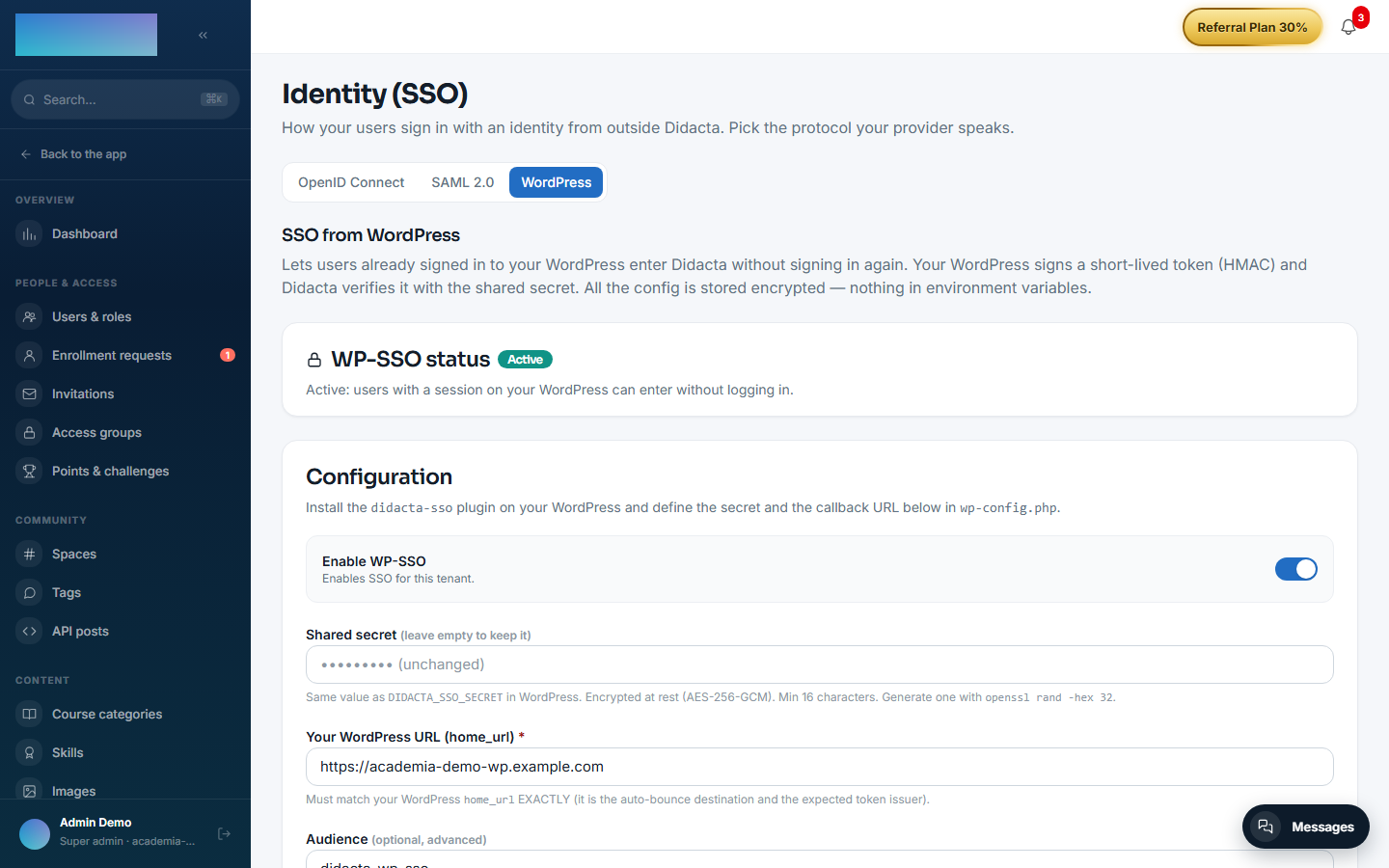
The configuration screen is Administration → Security → Identity (SSO) (/admin/sso), "WordPress" tab — the old route /admin/sso-wordpress still works as a redirect. Only super_admin / tenant_admin. It is Community, with no Enterprise capability (the OpenID Connect and SAML 2.0 tabs on the same screen are EE). Fields:
- "Enable WP-SSO" — enables SSO for the tenant.
- "Shared secret" — the same value as
DIDACTA_SSO_SECRETin WordPress; at least 16 characters, encrypted at rest (AES-256-GCM) and never returned in plain text (empty on save = keep the current one). The screen itself suggests generating it withopenssl rand -hex 32. - "Your WordPress URL (home_url)" — required; it must match the WordPress
home_urlEXACTLY (it is the expected token issuer and the auto-bounce destination). - "Audience" — optional; empty =
didacta-wp-sso(the plugin's default). - "Transparent auto-redirect" — Didacta's login bounces to the WordPress; with a session there, the user comes back authenticated; without one, it silently returns to the normal login.
- "Auto-provision users" — the first SSO creates the account (student role); when off, only users that already exist in the tenant can enter.
- "Callback URL (paste into wp-config.php)" — read-only; it includes the tenant slug.
All the configuration lives encrypted in the database per tenant — the module reads no environment variables of its own. The only env involved is WEB_PUBLIC_URL (the deployment's address), which hardens the base of the final redirect.
On the WordPress side, the wp-config.php constants: DIDACTA_SSO_SECRET, DIDACTA_SSO_CALLBACK and the optional DIDACTA_SSO_AUDIENCE (default didacta-wp-sso) and DIDACTA_SSO_TTL (seconds, default 120; Didacta rejects tokens with a TTL > 300 s).
Step-by-step usage
Didacta side (admin):
- Go to Administration → Security → Identity (SSO) and open the "WordPress" tab (
/admin/sso?tab=wordpress). - Generate a secret (e.g.
openssl rand -hex 32), paste it into "Shared secret" and type "Your WordPress URL (home_url)". - Press Create configuration (or Save changes if one already existed).
- Copy the "Callback URL (paste into wp-config.php)".
- Turn on the "Enable WP-SSO" switch and save.
WordPress side (as documented by the plugin itself):
- Copy
didacta-sso.phptowp-content/plugins/didacta-sso/didacta-sso.phpand activate it in the plugins panel. -
In
wp-config.phpdefine (same values as in Didacta):define('DIDACTA_SSO_SECRET', 'the-long-random-shared-secret'); // It includes the tenant slug; copy it AS IS from the Didacta panel: define('DIDACTA_SSO_CALLBACK', 'https://your-didacta.com/api/v1/modules/wp-sso/<tenant-slug>/callback'); // Optional: define('DIDACTA_SSO_AUDIENCE', 'didacta-wp-sso'); // default define('DIDACTA_SSO_TTL', 120); // seconds, default 120 (max 300) -
Link to Didacta with any of these options:
- Button/shortcode:
[didacta_sso_button label="Ir a Didacta"]. - Explicit URL:
https://your-wordpress/?didacta_sso=go(without a WP session it goes throughwp-loginand comes back). - Transparent URL:
https://your-wordpress/?didacta_sso=try(without a WP session it SILENTLY returns to Didacta's sign-in; this is the one the auto-bounce uses).
- Button/shortcode:
- Test the loop with the Test the bounce ↗ button on the WordPress tab (it appears when the configuration is active).
What the user sees: from WordPress, with a session open, the button takes them into Didacta already authenticated (302 to the callback → /auth/callback with the session). With "Transparent auto-redirect" on, visiting Didacta's /signin bounces to the WordPress and, if there is a session there, the user comes back authenticated without touching anything; if there is none, the normal login appears without noise. With "Auto-provision users" on, the first SSO creates the account with the student role; when off, anyone who does not exist in the tenant sees the user_not_provisioned error.
Dependencies
None.
Data model
No tables of its own: the only state (the consumed jti) is ephemeral and lives in Redis. Users are created/resolved in the core users table, and the sub → user link in the core external identities table.
API
GET /modules/wp-sso/:tenantSlug/status— public configuration (for the sign-in auto-redirect).GET /modules/wp-sso/:tenantSlug/callback?token=— exchanging the token for a session (302).- Admin:
GET/PUT/DELETE/api/v1/admin/sso/wp/config(Community, no capability required). The screen that consumes them is/admin/sso?tab=wordpress.
Events
Emits: wp-sso.signin.success, wp-sso.user.provisioned, wp-sso.account.linked. It consumes none.