mod.migrator-learndash — Migrator from WordPress + LearnDash
Community · Migration category · Beta · Distributed as a signed ZIP (third-party format)
What it does
It migrates a WordPress + LearnDash academy to Didacta: courses, lessons, topics, quizzes, questions, users, enrollments, media and progress (LearnDash groups are not loaded yet: see the MVP limitations). It is driven by a 6-milestone wizard (Start → Connect with a URL + Application Password → Source summary → Options → Trial → Full run), designed so a non-technical administrator can complete it in an hour. The trial genuinely imports 1 random course with up to 5 students so you can verify the result before committing to the full volume.
How it works
- An ETL pipeline with staging: it extracts into staging tables, transforms and loads with idempotent mapping by checksum — re-running duplicates nothing, and the full run reuses whatever the trial already loaded.
- Data errors go to a DLQ without aborting the job; at the end there is a reconciliation report (totals plus a per-entity breakdown) that includes the verification of the SHA-256 audit chain.
- It only reads from the source: the WordPress site is left untouched.
- Passwords: hashes are not imported (PHPass is not compatible with Argon2id); every user gets an email to set their own.
- The job runs on the backend: you can close the browser and it keeps going; the screen refreshes itself every 3 seconds.
- It is the real-world example of the third-party format: it is installed as a ZIP under Administration → Module marketplace, runs in the isolated VM with sandboxed
ctx.db/ctx.http/ctx.secrets, and its WordPress credentials are stored AES-256-GCM encrypted with a key scoped to the job.
Configuration
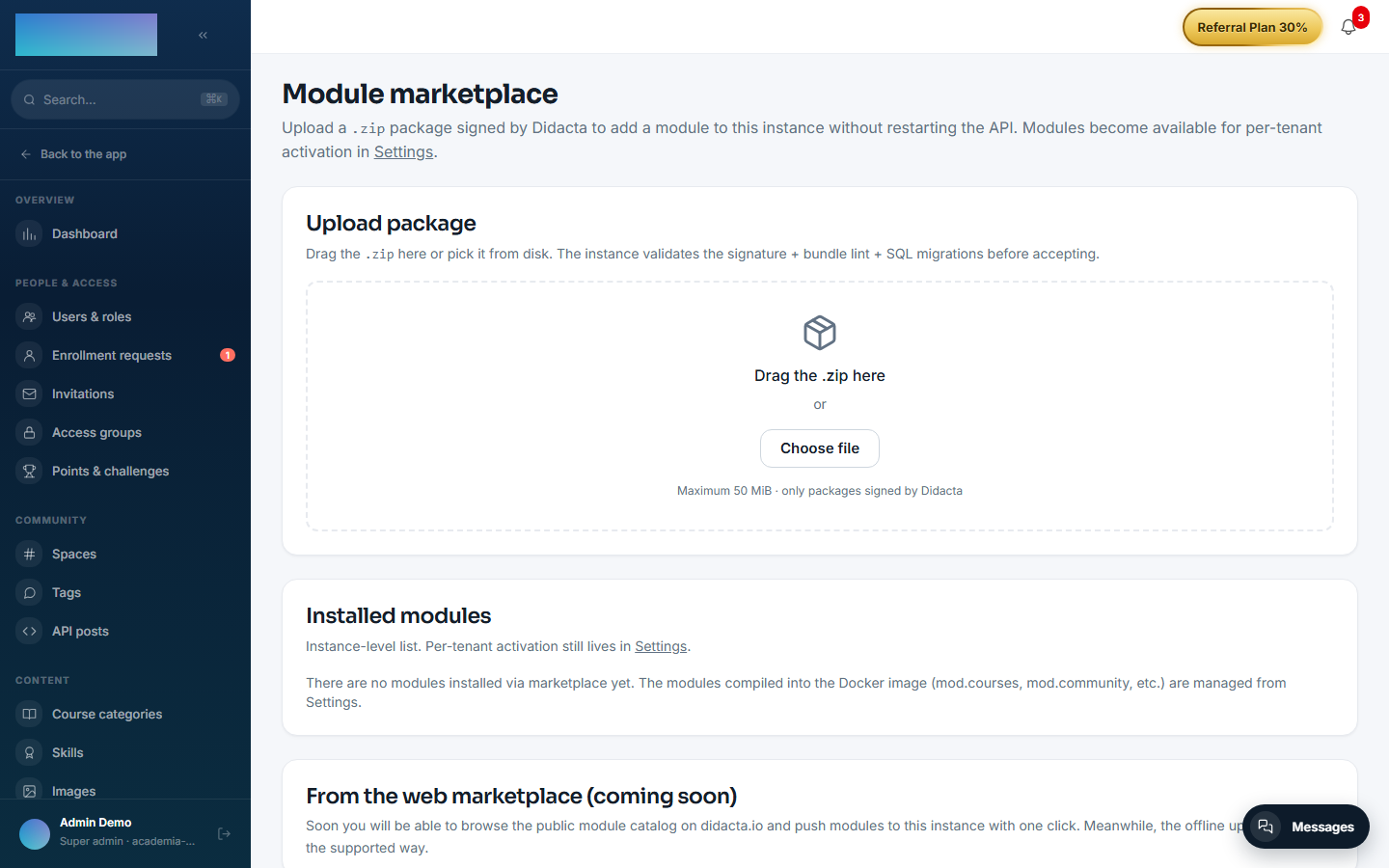
- Installation: it is a marketplace module, not enabled out of the box. In Admin → Module marketplace (
/admin/marketplace), Upload package area, drag the module's.zip; the instance validates the signature + bundle lint + SQL migrations before accepting. - Access: once installed, the Migrate from LearnDash entry appears in the admin menu (
/admin/integraciones/migrator-learndash). Only thesuper_adminrole can use it; everyone else sees a notice. - No environment variables and no settings screen of its own: the WordPress URL, user and Application Password travel in the job the wizard creates, encrypted with a key scoped to that job.
- Wizard options (Options step): what to migrate (courses only / only students enrolled in courses / everything), passwords (send activation email, the recommended default) and images (copy images into Didacta). Staging tables are retained for 30 days.
- Nothing requires an Enterprise license.
Step by step
Before starting: take a pg_dump of Didacta (it is the supported way back) and have an administrator user of your WordPress with LearnDash reachable over HTTPS.
The wizard's interface currently ships in Spanish only; the labels below quote it verbatim with translations.
- In your WordPress, create an Application Password for the administrator user (Users → Profile → Application Passwords). Do not use the normal password.
- In Didacta, open Migrate from LearnDash, tab «Crear migración» (create migration), and click «Comenzar» (start).
-
Connect: fill in «URL de tu WordPress», «Usuario administrador» and «Application Password», and click «Comprobar y continuar» (check and continue).
-
Summary ("this is what we are going to migrate"): counts of courses, lessons, topics, quizzes, groups and students, samples of the 5 most recent entities per type, and the source warnings. Click «Continuar».
- Options: choose what to migrate, the password strategy and whether to copy images, then click «Empezar la prueba» (start the trial). The enrolled-students-only mode requires the courses to be migrated first: enrollments of unmigrated courses are recorded as incidents in the report.
- Trial: 1 random course and up to 5 students are imported. The screen refreshes every 3 seconds and you can close the browser. When it finishes you see the Source / Loaded / Skipped / Failed figures and the per-entity detail.
- Verify in Didacta that the trial course looks right, then decide: «Sí, hacer integración completa» (yes, run the full integration — idempotent: the trial is not duplicated, only what is missing gets added) or «Terminar aquí (conservo solo la muestra)» (stop here, keep only the sample).
-
On completion, the report shows the totals and the audit chain status. The «Monitor de migraciones» tab lists every job with its status, a cancel button while it runs, the reconciliation report and the DLQ with per-entity incidents (this is where, for example, unsupported LearnDash groups show up).
-
Imported users receive the email to set their password and can then sign in.
Dependencies
Required: mod.courses, mod.learning, mod.assessments — the load phase writes courses, lessons, quizzes and enrollments through their tables. Optional: mod.certificates, mod.community.
Data model
15 mod_migrator_learndash_* tables: _jobs, _mappings (source ↔ target per entity), _dlq, _audit_events (append-only, chained), _validation_reports and 10 staging tables (_stg_users, _stg_courses, _stg_lessons, _stg_quizzes…).
API
Prefix /modules/migrator-learndash: preflight, jobs (create, list, status, cancel), the per-job reconciliation report (which includes the audit chain verification) and the paginated DLQ. Progress is read by polling the job status.
MVP limitations
There is no automatic rollback: the supported path is restoring from the pg_dump you took beforehand. LearnDash groups are not migrated yet (enrollments are imported course by course; each group is recorded in the DLQ with an actionable message). Fine-grained quiz attempt history and already-issued certificates are not migrated (templates only). The wizard's interface is Spanish-only for now.