mod.access-groups — Access groups
Community · Core category (always active — trying to disable it returns 422 CORE_MODULE_NOT_DISABLEABLE)
What it does
It encapsulates the entitlement "which courses a member can see" as a composable building block. A group is defined with one of three kinds (kind):
ALL_COURSES— every published course, withautoGrantNewCoursesto enroll members automatically in each new course.COURSE/MULTI_COURSE— an explicit set of courses.
Group membership materialises as real core enrollments (through mod.learning, with origin GROUP), never by touching another module's tables.
How it works
- Members arrive through three routes with different owners: MANUAL (added by an admin or on registration approval — sticky, never revoked on its own), TIER (reconciled against
mod.payment-connectionstiers) and MEMBERSHIP (granted by the paid membership frommod.subscriptions). - The key design idea is refcounting with provenance: a course is only unenrolled when no live group grants it, and enrollments with origin
PURCHASE,SUBSCRIPTIONorAPIare never touched. - Revocation on cancellation or non-payment removes only the memberships whose origin is
MEMBERSHIP. In/admin/grupos-accesoand in the user dossier, those memberships are marked with the "By membership" badge. - Deleting a group revokes its memberships and cleans up orphaned drip schedules.
- A group can be flagged
isDefaultForApproval(granted when registrations are approved) or linked to a tier (linkedTierName).
It is a first-party module formalised as a package (modules/access-groups/, with its own manifest) whose NestJS orchestration — controller, Prisma service and event bridges — lives in the host (apps/api/src/modules/access-groups/), the standard built-in module pattern.
Configuration
Being a core-category module, it does not appear in the list of switchable modules (Administration → Brand & settings → Settings, "Modules" tab): it is always active for every tenant. It reads no environment variables of its own and no setting requires an Enterprise licence — everything is Community.
Everything is configured from the panel, always with an admin role (super_admin / tenant_admin):
- Create a group —
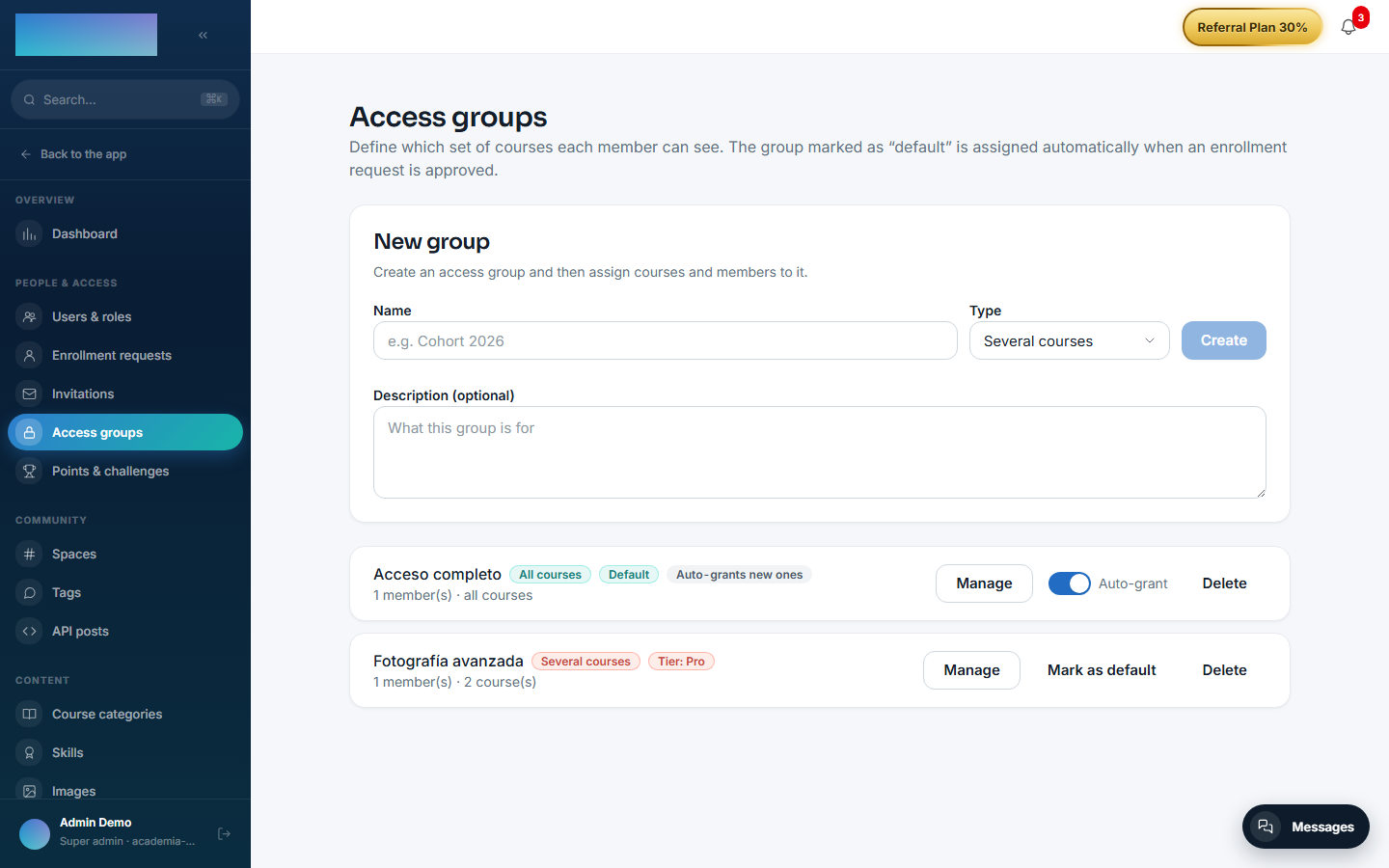
/admin/grupos-acceso(Administration → People & access → "Access groups"): fields "Name", "Type" ("All courses", "Several courses", "One course") and "Description (optional)". - "Mark as default" —
/admin/grupos-acceso: setsisDefaultForApproval; that group is granted whenmod.member-registrationrequests are approved. - "Auto-grant" switch —
/admin/grupos-acceso, only on "All courses" groups:autoGrantNewCourses, enrolls members in every course as it is published. - "Courses in the group" —
/admin/grupos-acceso→ "Manage": the course set of a "Several courses"/"One course" group, with "Save courses". - "Tier link (payments)" —
/admin/grupos-acceso→ "Manage": "Tier name" field + "Save link" (linkedTierName). Reconciliation is triggered with the "Sync tiers from payments" button on/admin/integraciones/payment-connections(owner:mod.payment-connections). - "Access group it grants" —
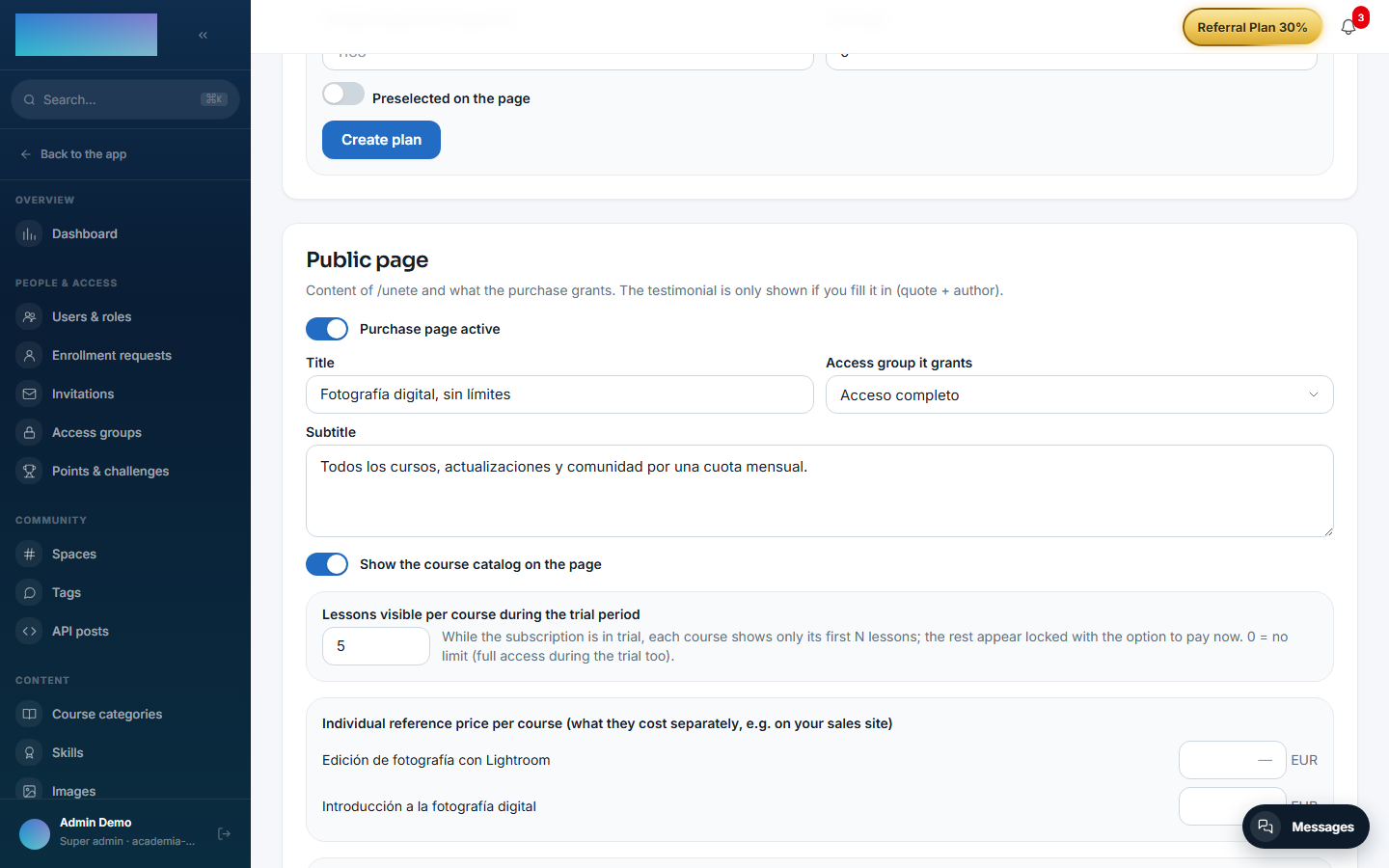
/admin/membresia: which group the paid membership grants. That setting belongs tomod.subscriptions, not to this module.
Step-by-step usage
- Go to Administration → People & access → Access groups (
/admin/grupos-acceso). - Under "New group", type the "Name", pick the "Type" and press Create.
- Press Manage on the newly created group:
- On a "Several courses" or "One course" group, tick the published courses and press Save courses.
- An "All courses" group needs no selection; turn on the "Auto-grant" switch if you also want it to enroll members in every new course.
- Add members by hand: search by name or email, press Search and then Add next to the user. These additions have origin
MANUAL(sticky): only an admin removes them with Remove. Members who arrived through payments are marked with the "By tier" and "By membership" badges.
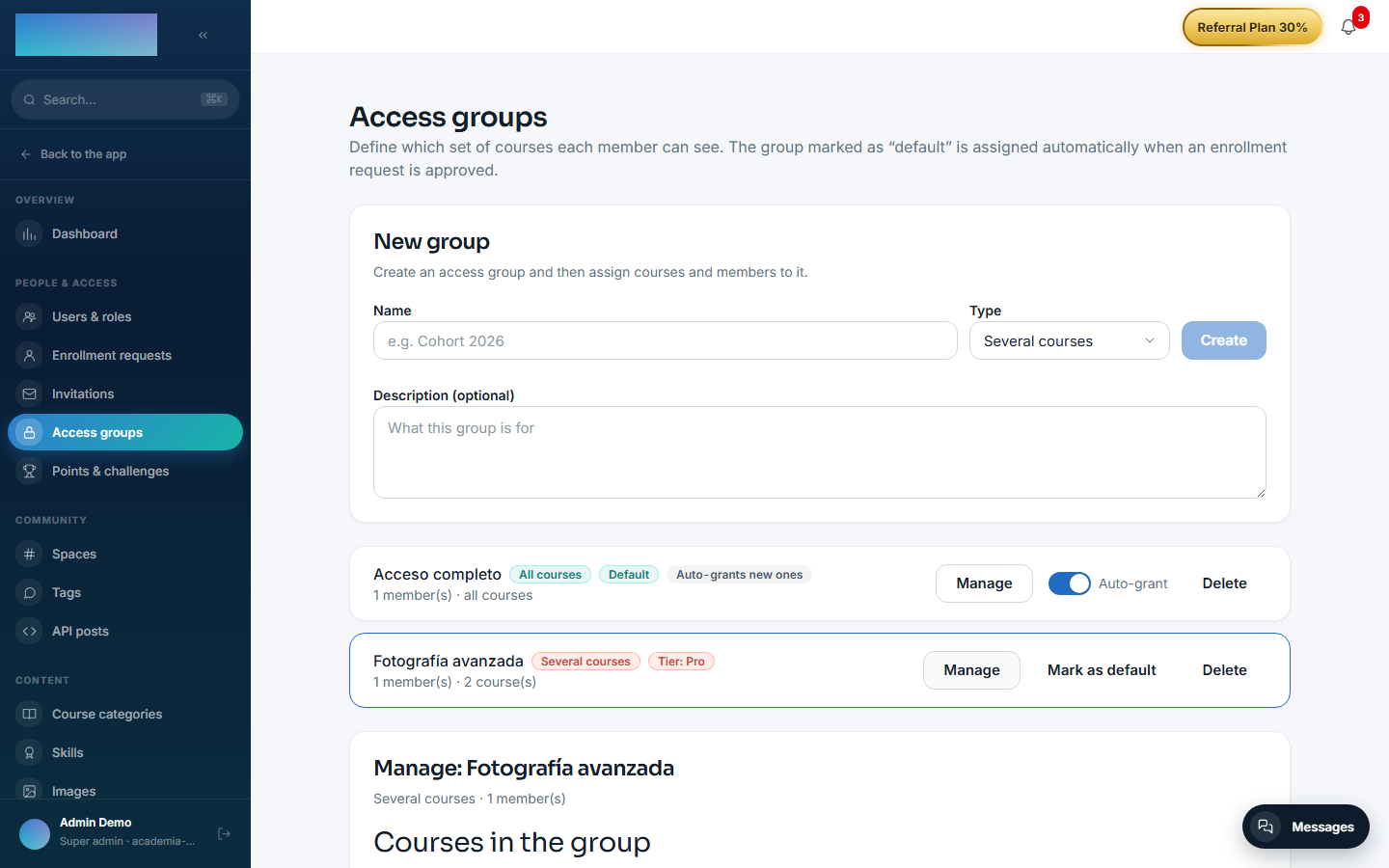
- (Optional) Press Mark as default on the group that should be granted when member registrations are approved.
- (Optional, with
mod.payment-connections) Under "Tier link (payments)", type the "Tier name" and press Save link. Users whose effective tier matches join (and leave when downgraded) when you press Sync tiers from payments on/admin/integraciones/payment-connections. - (Optional, with
mod.subscriptions) On/admin/membresia, pick the group under "Access group it grants" so the paid membership grants and revokes it on its own.
The member never sees "groups" on any screen: the group's courses simply show up as active enrollments in /cursos, and disappear when no live group grants them (enrollments from any other origin are never touched).
Dependencies
- Hard:
mod.courses,mod.learning. Optional:mod.payment-connections,mod.subscriptions.
Data model
mod_access_groups_group (group, kind, flags) · mod_access_groups_group_course (the group's courses) · mod_access_groups_group_member (membership with status and source) · mod_access_groups_grant (provenance/refcount per group, user and course).
API
Prefix /modules/access-groups — everything requires admin, reads included (they expose the roster). Details in Reference → Learning.
Events
- Emits: none.
- Consumes:
courses.course.published,payment_connections.user_tier.changed,subscriptions.membership.activated,subscriptions.subscription.activated/canceled/unpaid.