mod.learning — Player, enrollment and progress
Community · Core category (always active)
What it does
It manages the student's whole lifecycle inside a course: enrollment (direct, by an admin, by code or by invitation link), per-lesson progress (seconds watched, resume position) and completion with a configurable threshold (75% by default). On top of that:
- Drip content: release schedules based on intervals relative to the student's start date, segmentable by payment tier or by access group, with an optional email notice when a lesson unlocks.
- Invitations with a short code or a URL token, with a usage limit, an expiry date and revocation.
- Lesson comments with a moderation queue (they start as
PENDINGuntil the instructor approves them). - Learning paths (course itineraries, linear or flexible) and per-course weighted skills.
- SCORM 1.2/2004: package upload,
imsmanifest.xmlparsing and persistence of thecmi.*state per attempt.
How it works
- You can only enroll in
PUBLISHEDcourses (COURSE_NOT_PUBLISHED422); a duplicate active enrollment returnsALREADY_ENROLLED409. - When several drip schedules apply to a student, the most permissive one wins (the earliest unlock date). With no applicable schedule, everything is available.
- Trial content (membership trial) is gated with
TRIAL_CONTENT_LOCKED403, which the frontend turns into a payment CTA. - On crossing the threshold it emits
learning.course.completedexactly once — that is what triggers certificate issuing.
Configuration
- Activation: a
core-category module, always active. It does not appear in the "Modules" tab at/admin/configuracion?tab=modulesand cannot be disabled. - Completion threshold: an attribute of each enrollment (
completion_thresholdcolumn, default 75%). There is no global setting screen: it is set through the API when creating or editing the enrollment. - Drip per course: configured in the instructor's builder (
/formador/cursos/<id>, "Scheduled release (drip)" card), not in the admin panel. - Invitations per course: same builder, "Invitations" card.
- Skills: the catalog and its assignment to courses live at
/admin/competencias("Competencies"). - Environment variables:
LESSON_UNLOCK_CRONsets how often the worker that emails lesson-unlock notices runs (cron pattern, default*/10 * * * *). It is the only variable of its own. - Storage: SCORM packages are stored in the instance's file backend (
/admin/configuracion?tab=storage). - License: the whole module is Community; no feature requires Enterprise capabilities.
Step-by-step usage
Releasing content gradually — drip (instructor)
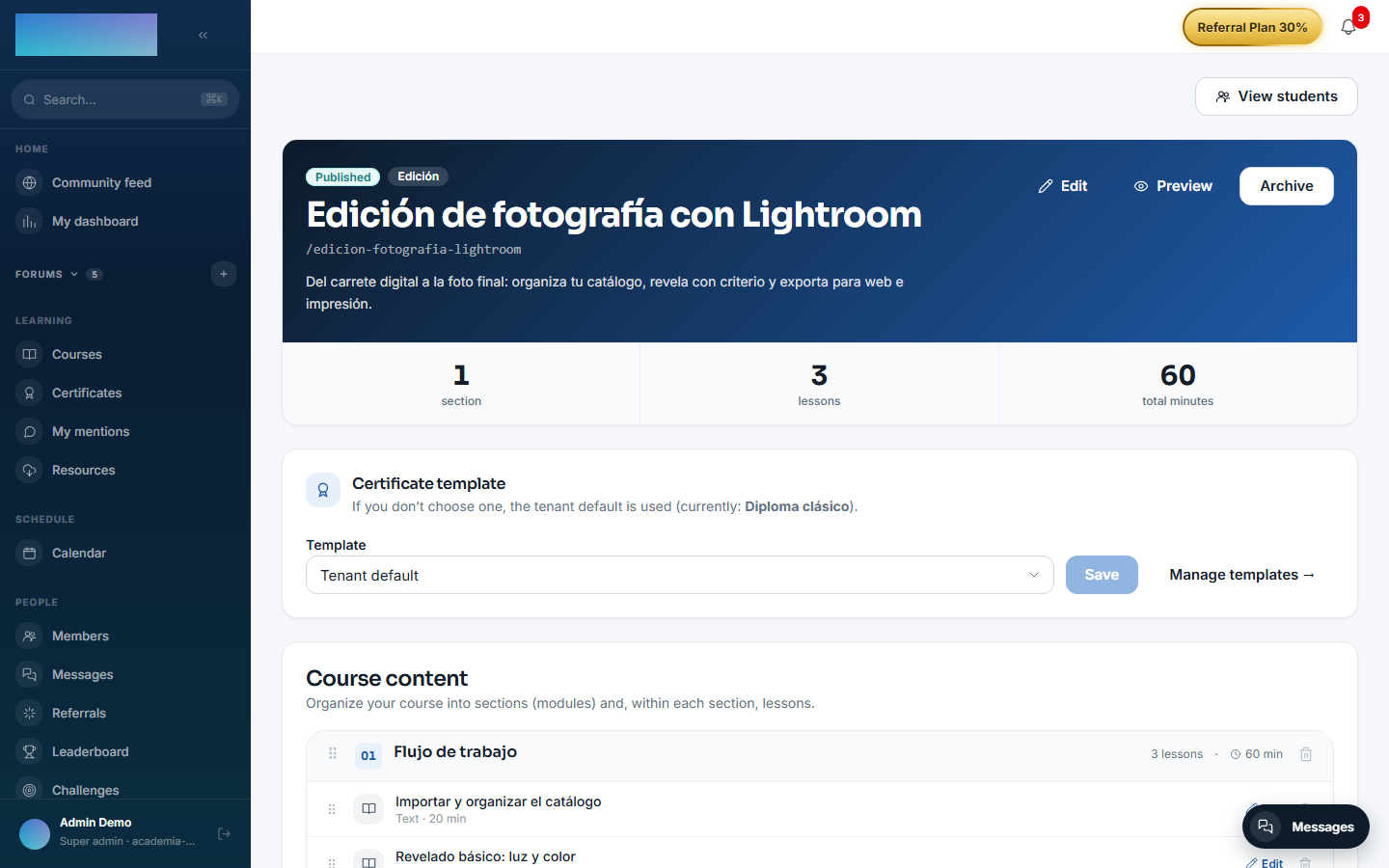
- In the builder (
/formador/cursos/<id>), scroll down to "Scheduled release (drip)". - Pick the "Audience": "By tier" (subscription plan, type the name in "Tier") or "By access group" (pick the "Group").
- Define the pace: "Release by" ("Lesson" or "Module / section"), "Every N days" and "1st unit after (days)". Click "Add schedule".
-
Each schedule can be toggled on/off or deleted. If several apply to a student, the most permissive wins; with no schedule, every lesson is available from the start.
Enrolling students with invitations (instructor)
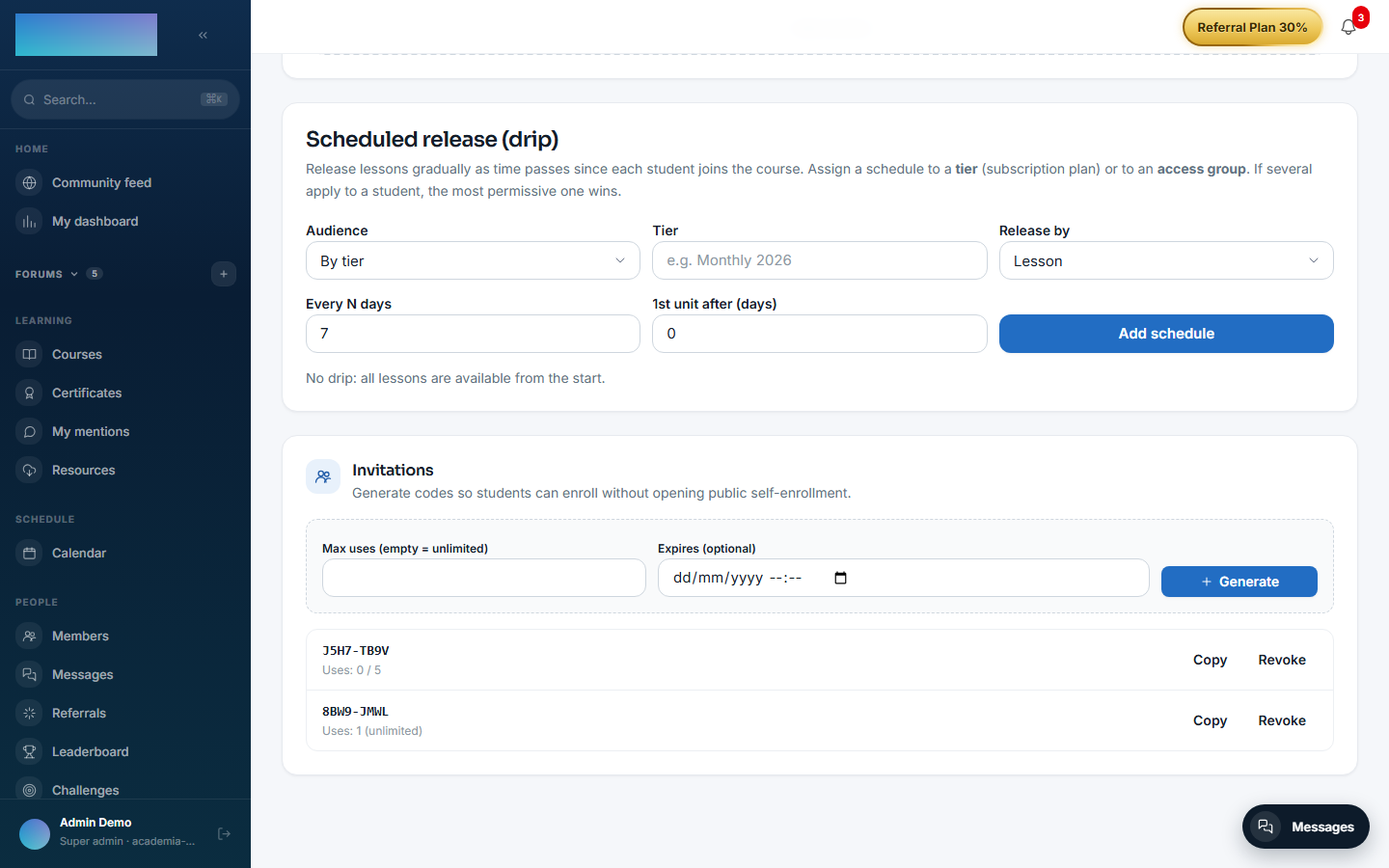
- In the builder, "Invitations" card: set "Max uses (empty = unlimited)" and "Expires (optional)" and click "Generate".
- Copy the short code ("Copy code") and hand it out; the card also shows the "URL token for a direct link", meant to be redeemed through the API (
POST /modules/learning/enrollments/by-link) — today the web app has no dedicated token-redemption page. -
"Revoke" invalidates an invitation; the list flags "Expired" or "Exhausted" ones.
-
The student redeems the code on the course page (
/cursos/<slug>): "Do you have an invitation code?" field and "Redeem code" button. Directly enrolling another user (POST /modules/learning/enrollments) is for instructors/admins via the API or the user-import flows.
Tracking student progress (instructor)
- From the builder, "View students" opens
/formador/cursos/<id>/alumnos: totals, active, completed, average progress, status filters and "Export CSV". -
"View progress →" opens
/formador/cursos/<id>/alumnos/<enrollmentId>: time watched per lesson, completed lessons and last activity.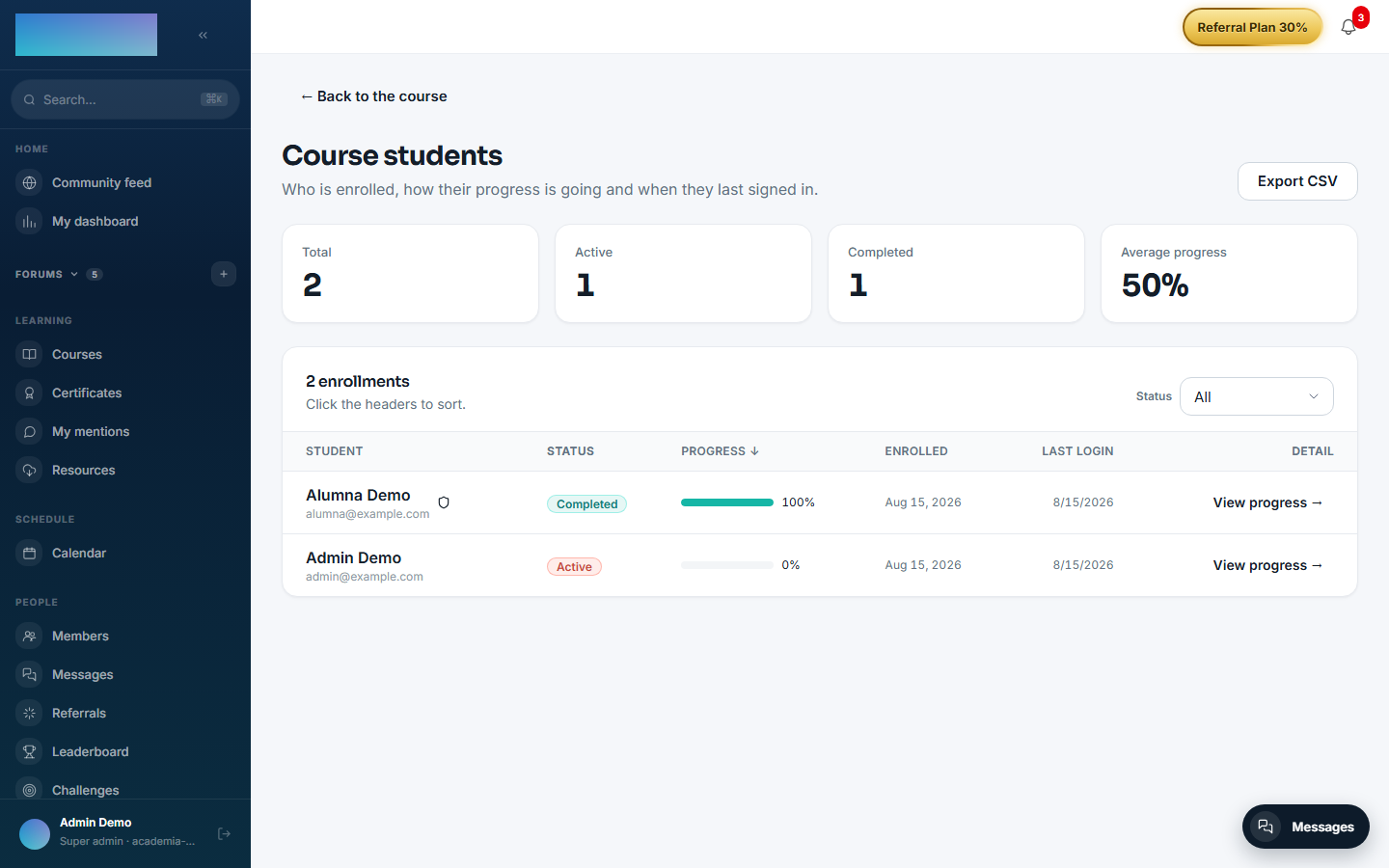
Moderating lesson comments (instructor)
- Students' comments start out pending: the "Pending comments" queue shows up right in the course builder.
- Approve the useful ones or reject them with an optional reason the author sees. The student writes from the lesson ("Do you have a question or note about this lesson?" → "Send comment") and sees the notice that comments go through the teacher before becoming visible.
Learning paths
- Instructor:
/formador/rutaslists your paths; "+ New path" (/formador/rutas/nueva) asks for "Title", "Description" and "Sequence type" ("Linear" or "Flexible"). - In the editor (
/formador/rutas/<id>) you add published courses with "Add course", order them and click "Publish" (requires at least one course). - Student:
/rutaslists published paths; at/rutas/<slug>they click "Enroll in this path". In linear paths, courses unlock in order ("🔒 Locked" chip).
Skills (admin)
- At
/admin/competencias, create the catalog ("Competency catalog" → "Add"). - In "Competencies per course", pick a course, mark the skills it covers and their weight, and click "Save". Each student's score is computed from their progress in the associated courses.
What the student sees
- On the course page (
/cursos/<slug>) an enrolled student sees "Your progress" with the goal (e.g. "62% · goal 75%") and the syllabus with each lesson's state. - The player stores seconds watched and the resume position; the "Mark as completed" button closes a lesson manually when the type allows it.
- A lesson gated by drip or a scheduled date shows as locked ("Will unlock…") with the "🔔 Notify me when it unlocks" button; the notice arrives by email when the worker runs.
- During a membership trial, lessons beyond the limit show "Available once the trial ends" with the "Pay now and unlock" option.
-
On crossing the threshold, the course switches to "Course completed!" and, with
mod.certificatesactive, "Download certificate" appears.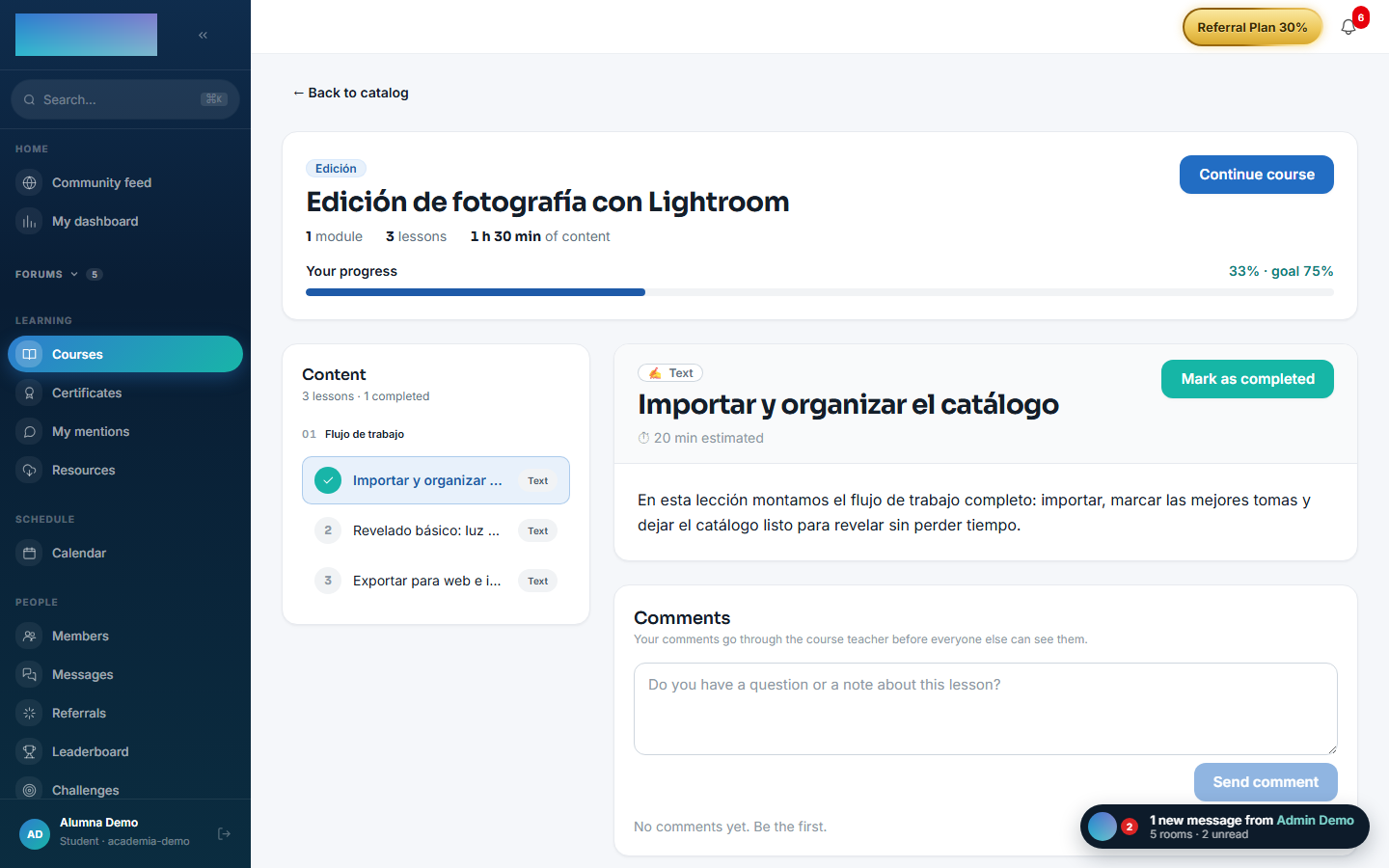
Dependencies
- Hard:
mod.courses. - Optional:
mod.payment-connections(tiers for drip),mod.access-groups(groups for drip),mod.subscriptions(trial status + lesson limit).
Data model
mod_learning_enrollment (one enrollment per user and course) · mod_learning_progress · mod_learning_invitation · mod_learning_drip_schedule · mod_learning_lesson_unlock_sub · mod_learning_scorm_package · mod_learning_scorm_attempt · mod_learning_lesson_comment · mod_learning_path + _path_course + _path_enrollment · mod_learning_competency + _course_competency.
API
Prefix /modules/learning (+ /modules/learning/paths). Full details in Reference → Learning.
Events
- Emits:
learning.enrollment.created,learning.enrollment.cancelled,learning.progress.updated,learning.course.completed,learning.invitation.created. - Consumes:
courses.course.archived.