mod.billing — Stripe Checkout (one-off payment)
Community · Core category (always active)
What it does
Course monetization with one-off payments through Stripe Checkout: the admin links each course to a Stripe price (or creates one from Didacta), the student clicks buy, the backend creates the Checkout Session and redirects to the hosted checkout. Once the payment is confirmed, the webhook completes the order and emits billing.order.completed, which mod.learning listens to in order to enroll the student with origin PURCHASE.
It also covers the public purchase journey: a visitor with no account buys from the public catalog (/catalogo) or from a course's sales page (/catalogo/<slug>); the order starts as PENDING with no owner and fulfillment materialises the account with the email confirmed by Stripe (find-or-create + a welcome email with a "set your password" link, template billing.welcome, editable per tenant under Administration → Emails). The return pages for a public payment are /catalogo/checkout/success and /catalogo/checkout/cancel.
How it works
- Explicit idempotency: every Stripe
evt_*event is persisted and never reprocessed — redelivering an anonymous checkout duplicates neither the account nor the enrollment. - Guards before charging: 404 if the course does not exist, 409 if it is not published, 409 if you already have access.
- With no Stripe configured the module still registers itself: the public catalog returns an empty list and checkout returns 503 with a clear message. The rest of the platform is unaffected.
- Refunds are issued from the Stripe dashboard; the
charge.refundedwebhook is processed and flags the order. Only a full refund moves the order toREFUNDED(and removes access); a partial one leaves the purchase in place.
Configuration
The module belongs to the core category: it is active in every tenant and has no switch of its own.
Stripe credentials (per tenant)
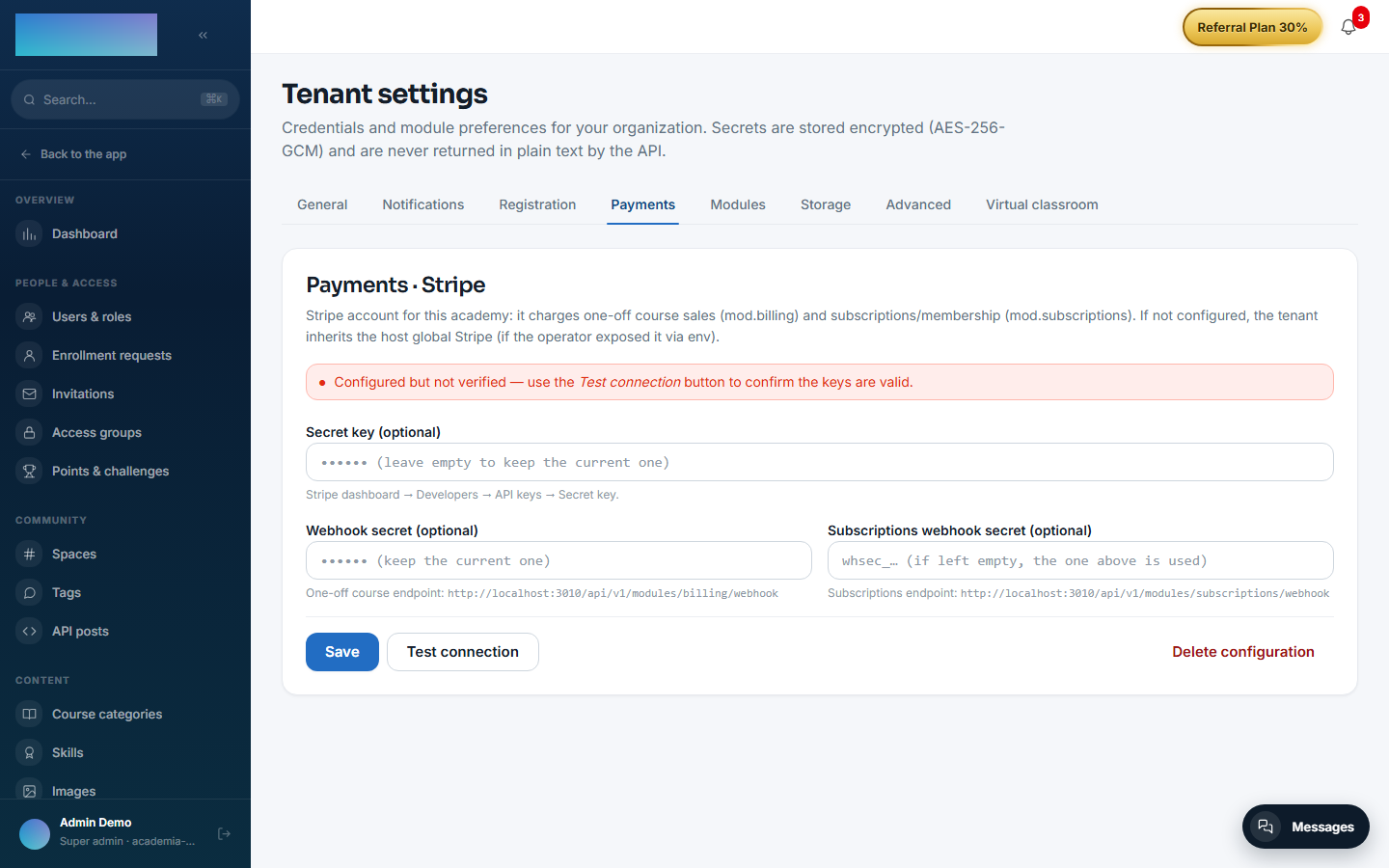
Under /admin/configuracion?tab=pagos (the Payments tab), card "Payments · Stripe" — shared with mod.subscriptions, a single key pair per academy:
- "Secret key" — the
sk_test_…orsk_live_…of your account (Stripe dashboard → Developers → API keys). - "Webhook secret" — the
whsec_…of the one-off course endpoint (see below). - "Subscriptions webhook secret (optional)" — only for
mod.subscriptions; leave it empty to reuse the one above. - Buttons "Save", "Test connection" (verifies against Stripe and tells you whether the account is in test or LIVE mode) and "Delete configuration".
The card opens with a status banner: verified, configured but unverified, "using the host's global Stripe (fallback)" or "no Stripe configured — selling courses and subscriptions/membership will not work". Credentials are stored encrypted; the fields are write-only (they are never shown back).
Webhook to register in Stripe
The card itself shows the exact URL. For this module:
- Endpoint:
https://<your-academy-domain>/api/v1/modules/billing/webhook - Events to select:
checkout.session.completed,checkout.session.async_payment_succeeded,checkout.session.expired,checkout.session.async_payment_failed,charge.refunded.
Paste the whsec_… Stripe generates into the "Webhook secret" field.
The five events are not optional
Each one closes a path, and whichever is missing stays open silently — Stripe does not warn you about what it isn't sending you:
- Without
async_payment_succeeded, a purchase paid by bank transfer or SEPA never enrols anyone: it waits forever. This is the most commonly forgotten one, because cards don't need it. - Without
charge.refunded, a refund does not revoke access. - Without
checkout.session.expired, abandoned carts pile up as eternally pending orders.
Which payment methods are accepted
Whichever you have enabled in your Stripe dashboard (Settings → Payment methods). Didacta does not pin the list: enable PayPal or Bizum and they show up at checkout without touching anything here or waiting for a new release.
Stripe filters down to what works for the amount, currency and country of the buyer.
If you enable delayed-notification methods
Bank transfer, SEPA and some Klarna flows do not confirm the charge on the spot: the buyer finishes the form and the money arrives hours or days later. Didacta handles this — enrolment waits for the confirmed charge, not for the form — but it requires checkout.session.async_payment_succeeded to be registered on the webhook. Without that event those purchases never complete.
Discount codes
The checkout screen accepts Stripe promotion codes. You create them once in the dashboard (Products → Coupons → Promotion codes) and they work for single-course sales and for the membership alike.
This is different from the compare-at price on each purchase option, which is a permanent discount rendered on the course page. The code is typed by the buyer; the strikethrough is seen by everyone.
Environment variables (instance fallback)
| Variable | What it is for |
|---|---|
STRIPE_SECRET_KEY / STRIPE_WEBHOOK_SECRET |
Instance fallback: used only if the tenant has not configured its own keys in the panel. The operator can forbid this fallback with the allowGlobalStripeFallback instance setting (scope billing, in instance_setting; allowed by default). |
BILLING_SUCCESS_URL_BASE / BILLING_CANCEL_URL_BASE |
Last-resort fallback for the return URLs: the HTTP checkout (authenticated and public) always passes per-request URLs derived from the real Host — /cursos/checkout/success|cancel for the authenticated one, /catalogo/checkout/success|cancel for the public one — so these variables only apply if an in-process caller omits the URLs. |
No feature of this module is gated behind an Enterprise licence.
Products (course ↔ price)
Under /admin/billing/products ("Payments · Stripe products"): the "Link a course to a Stripe Price" form has a "Course" selector (only published, unlinked courses) and the "Stripe Price ID" field (a price_… created beforehand in your Stripe dashboard); button "Link". The backend validates against Stripe that the price exists and is active before saving. Through the API, the same endpoint alternatively accepts an amount (amountCents) and creates the Product + Price in Stripe for you; a course supports several purchase options (option name, strikethrough price, featured), which the panel lists and the catalog renders as formats.
Step-by-step usage
- Configure Stripe under
/admin/configuracion?tab=pagos: save the "Secret key", register the webhook in Stripe with the URL and events above, paste the "Webhook secret" and click "Test connection". -
Under
/admin/billing/products, link the course: pick the "Course", paste the "Stripe Price ID" and click "Link". Each listed product offers "Change Price ID", "Deactivate"/"Reactivate" and "Unlink" (historical orders are kept). If Stripe is not configured, the page says so with the link "Configure Stripe in Administration → Payments".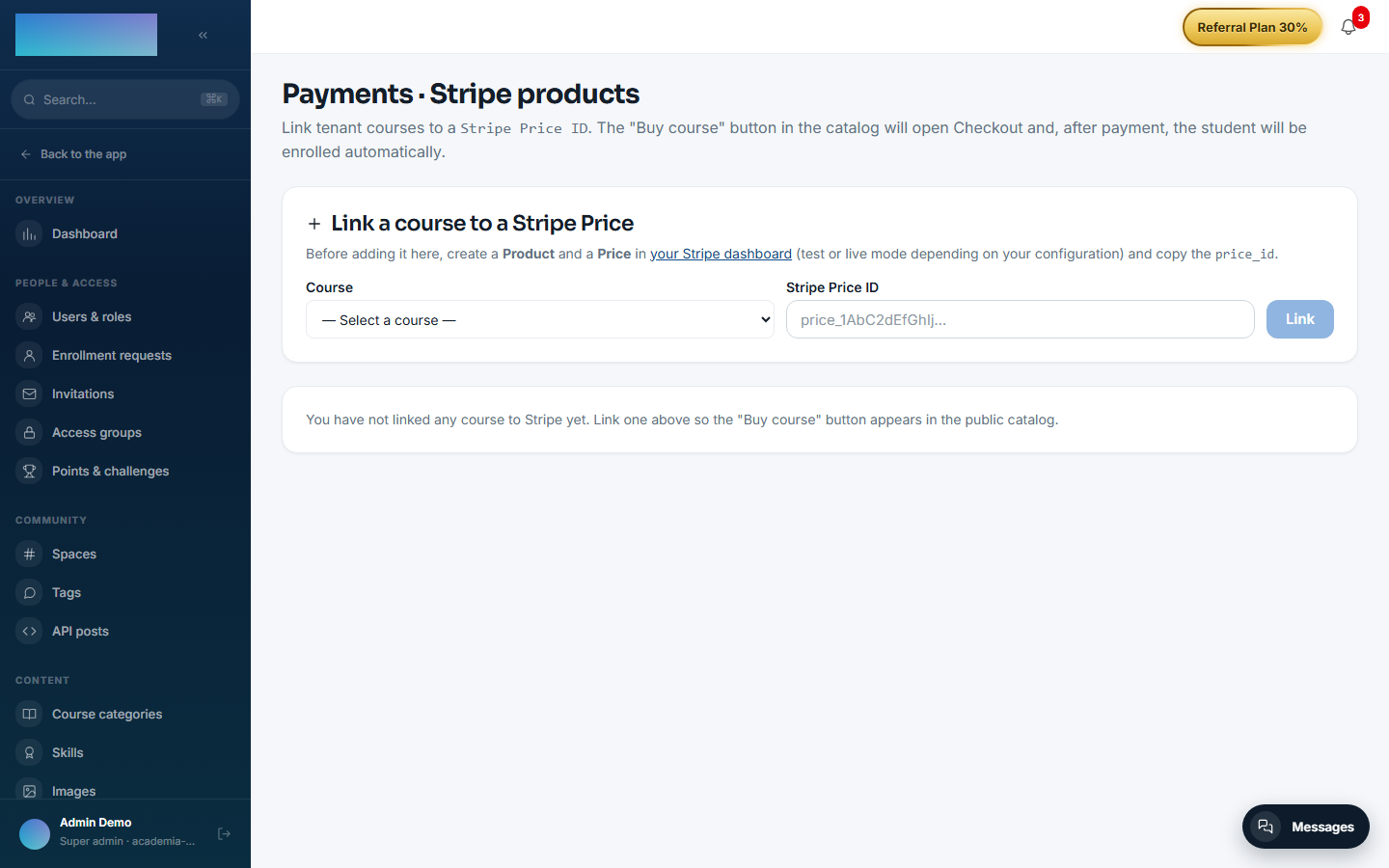
-
Selling to a student with an account:
/cursos/<slug>shows the "Start this course" box with the "Buy" button (if the course has several options, the "Choose your format" section lists them with price, discount and the "Most popular" tag). Payment opens Stripe's hosted checkout and returns to/cursos/checkout/success. -
Selling to a visitor without an account:
/catalogolists the courses on sale ("View course") and/catalogo/<slug>is the sales page with "Buy now" ("Secure payment with Stripe. VAT included."). After paying, they land on/catalogo/checkout/success— "Thank you for your purchase!" — and get the email to set their password; if the email already had an account, the course is added to it. -
The webhook completes the order (
COMPLETED) andmod.learningenrolls automatically with originPURCHASE. Nothing to do by hand. - Refunds: issue them from the Stripe dashboard. A full refund marks the order
REFUNDEDand removes access; a partial one leaves the purchase in place.
Dependencies
Hard: mod.learning, mod.courses.
Data model
mod_billing_product (sellable course ↔ price, unique per course and per price) · mod_billing_order (the purchase: PENDING → COMPLETED | CANCELLED | FAILED | REFUNDED, with a nullable user_id for anonymous purchases) · mod_billing_webhook_event (idempotent log, PK = stripe_event_id).
API
Prefix /modules/billing: authenticated checkout, public surface (public/catalog, public/offer, public/checkout), admin CRUD for products, and the webhook. Details in Reference → Payments.
Events
Emits: billing.order.created/completed/failed/refunded. It consumes none.