mod.surveys — Surveys and NPS
Community · Engagement category (can be disabled)
What it does
Anonymous community surveys. The main use case: at the end of every live class (zoom.session.ended) the post-class survey is created automatically (NPS + rating), the registered attendees are notified and the admin sees the aggregate results (NPS, averages, free-text answers). It includes a reminder worker for anyone who has not answered after 24 h.
How it works
- Anonymity is structural: the response stores no
userId, only arespondentHash= HMAC(survey:user) with a server-side secret — enough to deduplicate (one response per person) without being able to identify the author. - One survey per Zoom session and one reminder per survey (guaranteed with unique constraints in the database).
- The admin can create a class's survey without waiting for the webhook, close surveys (they stop accepting responses with a 409) and force the reminder sweep.
- The model also covers course-completion and general tenant surveys (
POST_COURSE,GENERAL), which have no automatic trigger yet.
Configuration
Enabling or disabling the module. Under /admin/configuracion?tab=modules (the "Modules" tab of Settings), with the "Enable …" / "Disable …" buttons on the module's row. With the module enabled, the "Surveys" entry appears in the Content group of the admin panel; with it disabled, the student panel simply does not render.
Per-tenant settings. There are none: neither the post-class survey nor its questions can be edited from the panel (the 4 questions are fixed on purpose, so results are comparable across classes and over time).
Email templates. The module's two emails — the invitation when the survey is created and the 24 h reminder — use the surveys.post_class.invitation and surveys.post_class.reminder templates, customizable under /admin/emails. Both notices also go out through the in-app channel.
Environment variables (installation-wide, not per tenant):
| Variable | Effect | Default |
|---|---|---|
SURVEYS_HASH_SECRET |
Secret for the respondentHash HMAC. At least 16 characters and stable across deploys: changing it breaks the "already answered" dedupe. |
Falls back to AUTH_SECRET |
SURVEYS_REMINDER_CRON |
Frequency of the reminder sweep (cron, UTC). | */15 * * * * |
SURVEYS_REMINDER_DELAY_HOURS |
Hours without answering after which the reminder is sent. | 24 |
The reminder worker needs REDIS_URL (without Redis it does not start, with a log warning) and uses WEB_PUBLIC_URL for the link to the class. It only reminds about surveys up to 72 h old (a fixed product cap: a late deploy does not spam old surveys).
License. Nothing in this module requires an Enterprise license.
Step by step
As an admin
- Enable
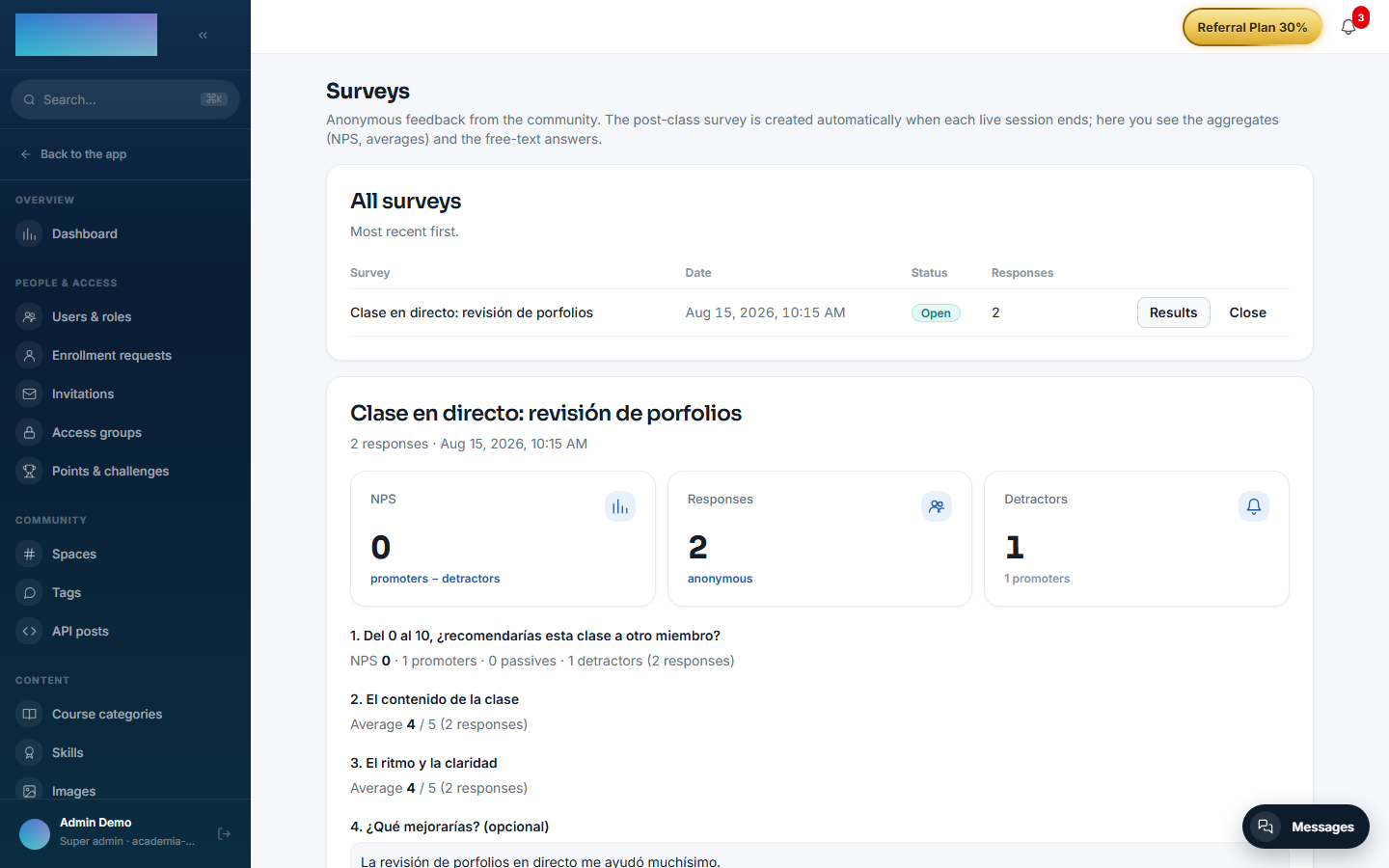
mod.surveys(withmod.zoom-liveenabled if you want the automatic post-class survey). - There is nothing to create: when each live class ends, the survey is created on its own with its 4 fixed questions — NPS 0-10 ("From 0 to 10, would you recommend this class to another member?"), two 1-5 scales ("The class content", "Pace and clarity") and an optional free-text one ("What would you improve? (optional)"). Registered attendees get the in-app notice and an email with the link to the class page.
-
Open "Surveys" (
/admin/encuestas): a table with the columns "Survey", "Date", "Status" ("Open"/"Closed") and "Responses", most recent first. -
Click "Results" on a row: you will see the NPS (promoters 9-10 minus detractors 0-6, in points), the average of each scale question and the free-text answers with no author.
-
Click "Close" when you want to stop accepting responses (later submissions get a 409).
- Two actions have no button and are API-only: creating a session's survey without waiting for the webhook (
POST /modules/surveys/admin/sessions/:sessionId) and forcing the reminder sweep (POST /modules/surveys/admin/reminders/run).
As a student
-
Go to the class page (
/clase/[id]). If the class has an open survey and you have not answered it yet, the "Rate this class" card appears at the bottom, with the note that your answer is anonymous.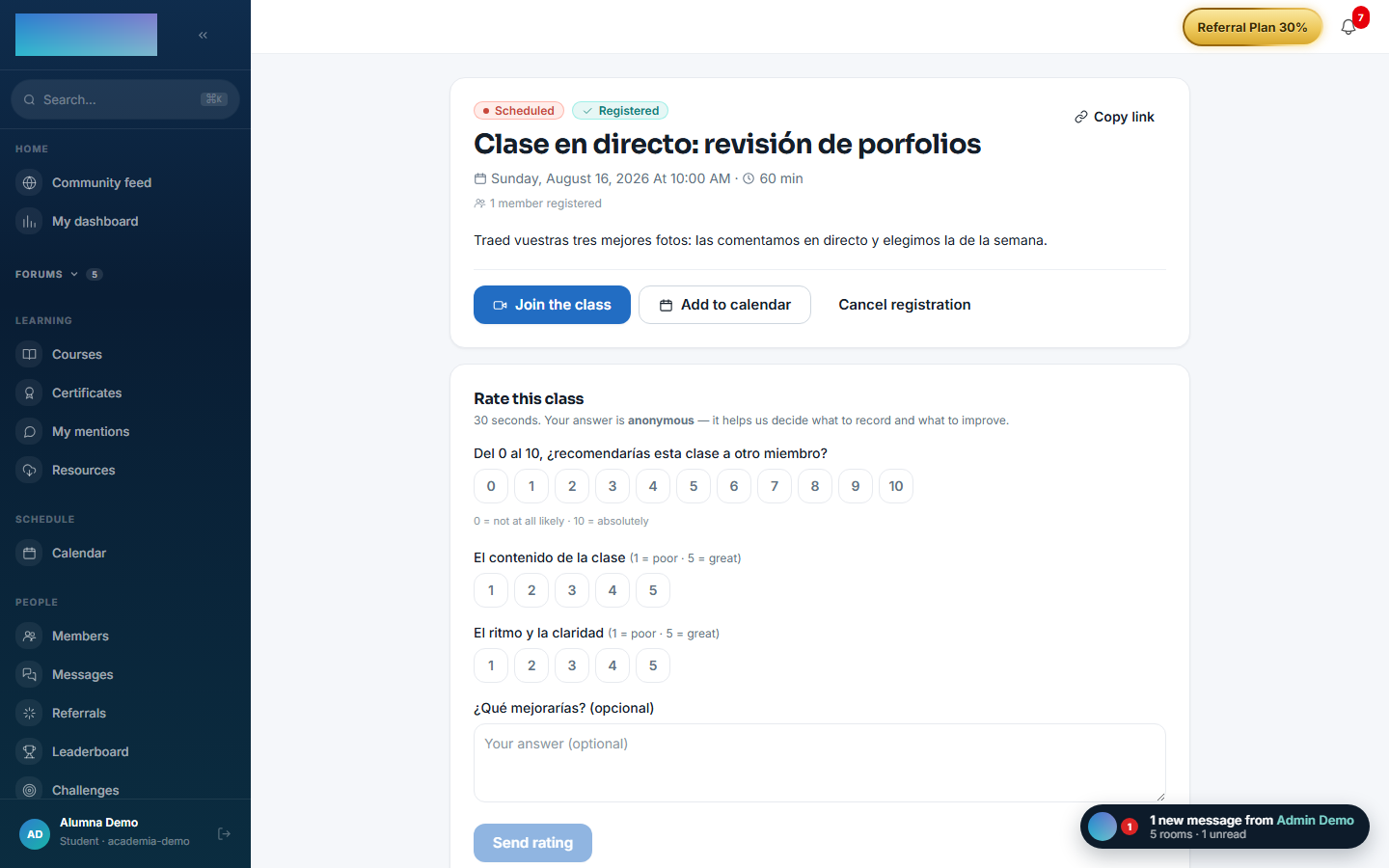
-
Answer by tapping the 0-10 (NPS) and 1-5 buttons (scale "(1 = poor · 5 = great)"); the free text is optional. The "Send rating" button only activates once every scored question is answered.
- After sending you will see "Thanks for your feedback! We'll take it into account for upcoming classes.". Only one submission per person is accepted; a second attempt (another tab, a double click) lands on the same thank-you state.
- If you have not answered after 24 h, you will get a single reminder with the link to the class.
Dependencies
Optional: mod.zoom-live (reading the registered attendees in order to notify them when the post-class survey is created).
Data model
mod_surveys_survey (type, OPEN/CLOSED status, reminder flag) · _question (typed and positioned) · _response (anonymous, respondentHash only) · _answer (numeric or text value).
API
Prefix /modules/surveys (student + admin). Details in Reference → Community and people.
Events
- Emits:
surveys.survey.created,surveys.response.submitted. - Consumes:
zoom.session.ended(creates the post-class survey).